 ClockBear
Time clock & attendance,
for teams anywhere.
Your team punches in from their own phone. You get tamper-proof records, overtime and break rules that follow the law in every location, time-off approvals and payroll-ready exports — in one hub.
Works worldwide · Set up in minutes · No paperwork, no clunky terminals

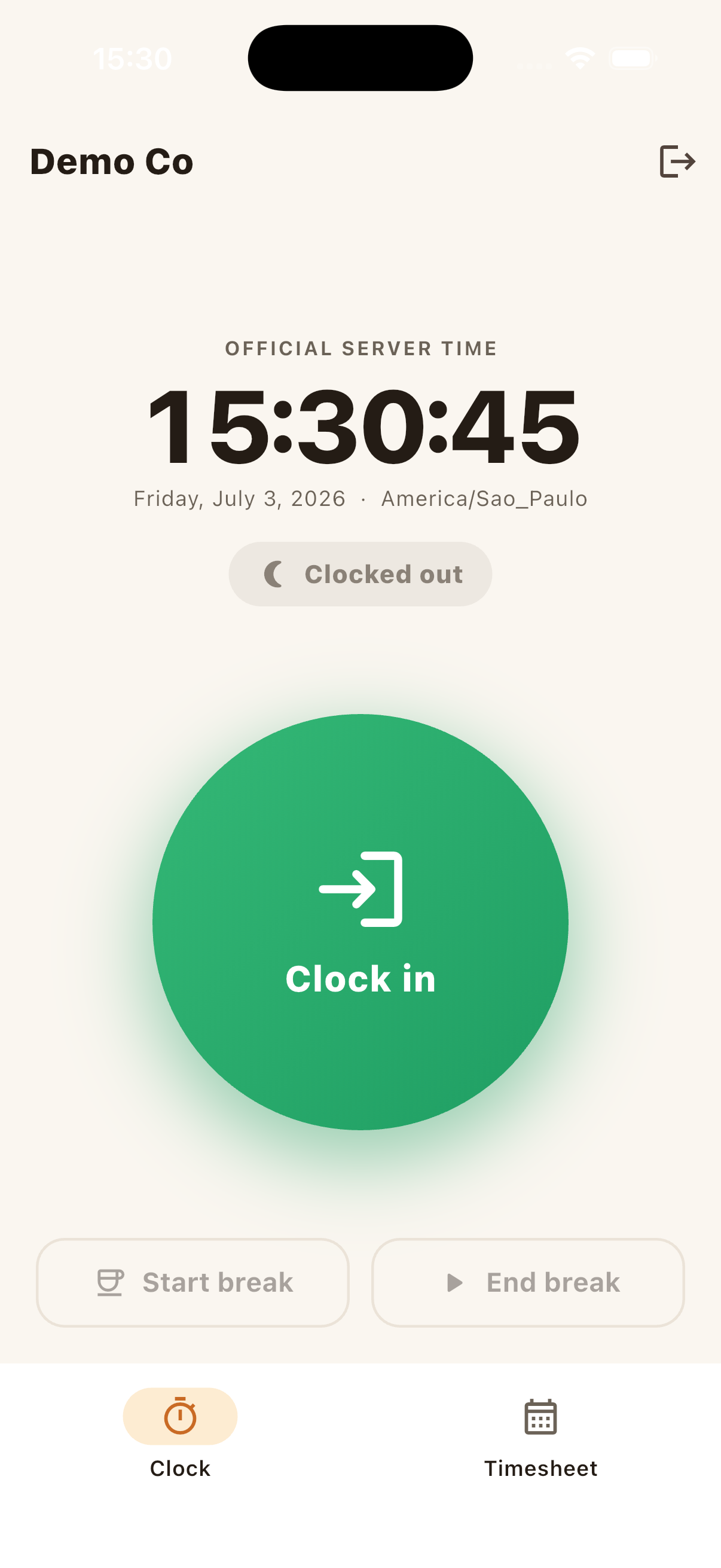
The real app — one tap to clock in, a receipt for every punch.
Every punch is tamper-proof
Each entry is append-only and hash-chained, so records can't be quietly edited. Need to fix a mistake? A correction adds a new record — the original stays, with a full audit trail.
- Append-only, cryptographically chained
- Corrections never erase history
- Server-official time, never the device clock

Works even without a signal
On a job site, a basement, or a dead zone — the app keeps working. Punches are signed on the device and sync automatically the moment a connection returns, with clock-manipulation checks.
- Offline-first, device-signed punches
- Automatic background sync
- Anti-fraud clock checks on every entry

Follows the law in every location
Overtime, breaks and record retention follow local rules automatically — US federal (FLSA) and states like California, the EU Working Time Directive, and more. Sensitive features stay off by default.
- Per-jurisdiction overtime & break rules
- Retention that matches local law
- Consent-first: geo & biometrics off by default

Built for how work actually happens
Remote, hybrid, multi-site, multi-timezone — ClockBear keeps every punch honest and every hour accounted for.
Punch from any phone
No hardware. A tap to clock in, out or start a break, with a receipt for every punch.
Tamper-proof records
Every entry is append-only and hash-chained. Corrections add a new record — the original is never erased.
Works offline
No signal? Punches are signed on the device and sync automatically later, with clock-manipulation checks.
Rules per jurisdiction
Overtime, breaks and retention follow local law — US federal & state (California and more), the EU, and more.
Time off & approvals
Employees request PTO; managers approve in a queue. Vacation balances and overtime sign-off, built in.
Geofencing & anti-fraud
Optional worksite geofencing and device attestation — off by default, with explicit consent.
Manager dashboard
Live headcount, hours, overtime, absenteeism and estimated payroll cost at a glance.
Payroll-ready export
One-click CSV/JSON of hours, overtime and PTO — drops straight into your payroll provider.
Server-official time
The official time comes from the server, never the device clock. Every punch is UTC + timezone.
Up and running in minutes
No terminals to install, no training day.
Create your company
Pick your jurisdiction and add your team from the manager panel.
Staff install the app
Employees sign in on their phone and start punching — online or off.
Approve & review
Approve time off and overtime, watch the live dashboard, fix entries with a full audit trail.
Export to payroll
Close the month with a payroll-ready export. Register → approve → pay.
Simple, honest pricing
Start free. Upgrade only when your team grows — no card required to begin.
Free
For small teams getting started.
- Up to 5 employees
- Unlimited punches
- Offline-first mobile app
- Manager dashboard & live team view
- Payroll CSV / JSON export
Pro
For growing teams — pay only for who's on the clock.
- Everything in Free
- Unlimited employees
- Advanced payroll & compliance exports
- Priority support
Prices in USD · billed monthly per active employee · cancel anytime
Need more features? Just ask.
Tell us what your business needs and we build it for you — usually in less than 24 hours. Your workflow, your rules, no waiting on a roadmap.
Request a feature Real humans, fast replies · Free while your team is smallCompliance is the point, not an afterthought
Sensitive features like location and biometrics are off by default and require explicit consent (GDPR / CCPA). Every record is append-only and hash-chained, retained per jurisdiction, with a full audit trail built in from day one.
Frequently asked questions
Everything you need to know before you start.
Do my employees need to buy anything?
No. They install the free ClockBear app on their own iOS or Android phone and sign in — no terminals, badges or hardware to buy.
Does it work without internet?
Yes. Punches are signed on the device and sync automatically the moment a connection returns, with clock-manipulation checks so offline time stays trustworthy.
How do you keep the time honest?
The official time comes from our server, never the device clock, and every entry is append-only and hash-chained. Corrections add a new record instead of erasing the original, so there's always a full audit trail.
Which countries and rules are supported?
Overtime, breaks and retention for US federal (FLSA) and states like California, plus the EU Working Time Directive. Rules live as data, so we keep adding jurisdictions over time.
Is my team's location tracked?
Only if you turn geofencing on, and only with each employee's explicit consent. Location and biometrics are off by default to respect GDPR, CCPA and other privacy laws.
What does it cost?
Free for up to 5 employees. Pro is $4 per active employee / month — so you only pay for who's actually on the clock — with unlimited employees, all fiscal exports and priority support. Cancel anytime.
Get ClockBear
The employee app goes on their phone. The manager panel runs anywhere.
Employee app
Clock in from any phone — online or offline, with a receipt for every punch.
Manager panel
Live dashboard, timesheets, approvals and payroll-ready exports.
Runs in any browser — or hit “Install” in your browser to add it to your desktop like an app.Start free today
Create your company in minutes and invite your team. Free for up to 5 employees — no card required to start.
iOS & Android apps · manager web panel · free for up to 5 employees